| Software screen |
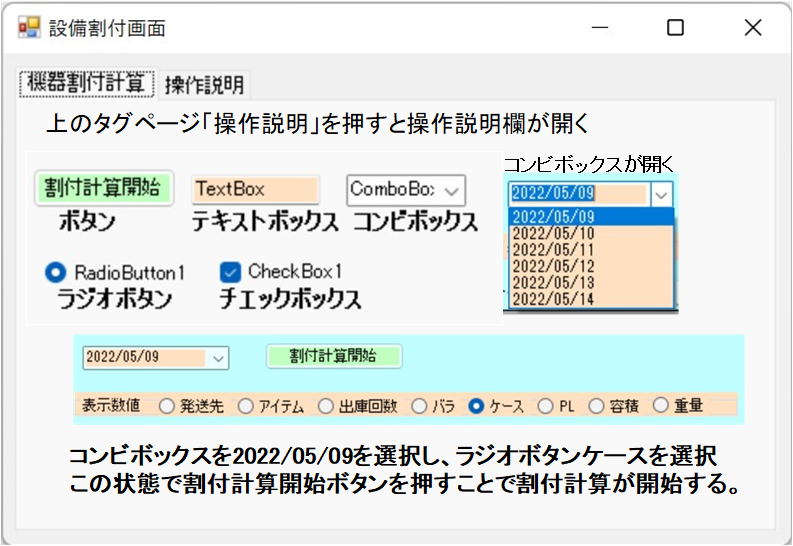 |
Think of tag pages as having sticky notes attached to them that you use to open the page you want to see. You can place tag pages within tag pages, allowing you to control the screen in systematic detail, from the trunk to the branches, from the branches to the twigs, and from the twigs to the leaves. Pressing (also known as clicking) a button will perform the process or calculation displayed on it. A text box is a window (display field) for entering characters or numbers; the operator types characters or numbers into this window, and the software receives this information. Another role of a text box is as a field for outputting the results of calculations; the information displayed here cannot be changed by input.。 |

A DataGridView is a table displayed on the screen.
CheckBoxes perform processing (calculations) using checked options, or remove checked options and perform other processing.
GroupBoxes specify a range. Processing and calculations are performed within the display range of the group box. If there are three checkboxes within a group box, processing and calculations will be performed for all three.
Other checkboxes on the same screen will not affect this.
RadioButtons process the term specified by the click. Specifying a case performs case conversion, and selecting PL performs PL conversion.
Labels explain the processing and display the meaning of input and output values.