第6節 Tera計算ソフト構成


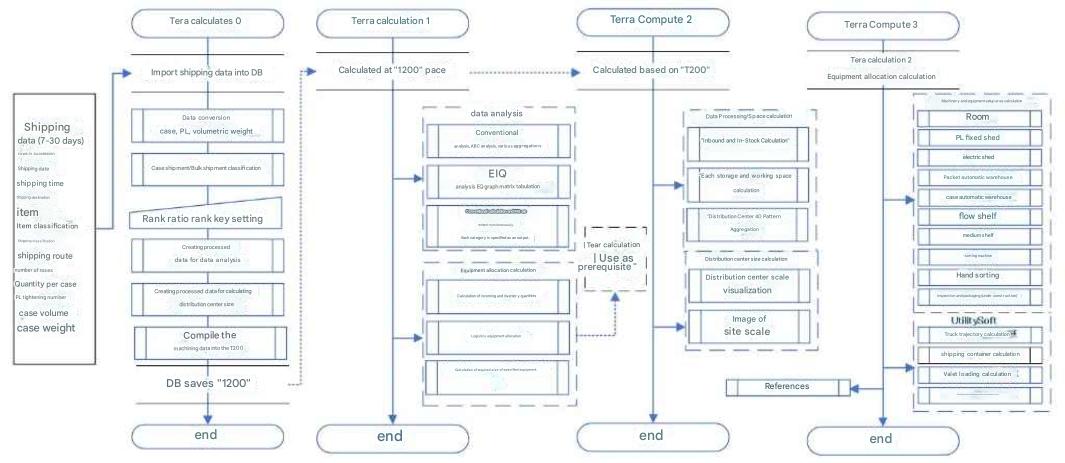
Item 1 Software Flow Diagram

Tera Calculation Software

Tera Calculation 0 - Shipping Data Processing
Frequently used calculations in Tera Calculation 1 and Tera Calculation 2 are pre-calculated and stored in Access (the "T200" table).
Tera Calculation 1 and Tera Calculation 2 are based on "T200."

Tera Calculation 1 - Shipping Data Analysis Calculation/Equipment Allocation
Using EIQ analysis, data is divided into 25 categories by shipping rank and output to an EIQ matrix table.
In addition, equipment is allocated to the EIQ matrix table and the required size of that equipment is calculated.

Tera Calculation 2
calculates incoming and outgoing shipments and inventory, calculates the required floor space for each piece of equipment according to Tera settings, and automatically calculates distribution center size and site area.
You can change one or more Tera settings and recalculate with all changes reflected.
Calculates 40 different building sizes, including the number of building floors and berths. This allows you to visualize the tradeoff between building size and site size.

Tera Calculation 3
is a utility software that calculates the floor space of each piece of equipment.
After calculating the required size of equipment using Tera Calculation 1, the software user calculates the floor space for each piece of equipment and sets the size of the distribution center.
By imitating the procedures and methods used in Tera Calculation 2, users can learn how to set the size of a distribution center using Tera Calculation 3.
Reference materials are also included.

Tera Calculations commonly
distinguish between case-based and bulk shipments.
Selective aggregations are available for the number of shipments, number of bulk shipments, case conversion, product liability conversion, volume conversion, and weight conversion.
These aggregations can also be conditionally aggregated by specifying "shipping time," "shipping route," "item classification," and "shipping classification."
In addition, calculations are performed simultaneously using the calculation method and the EIQ method, allowing users to check the differences.
Chapter 1 Overview of Tera Calculation Softwar

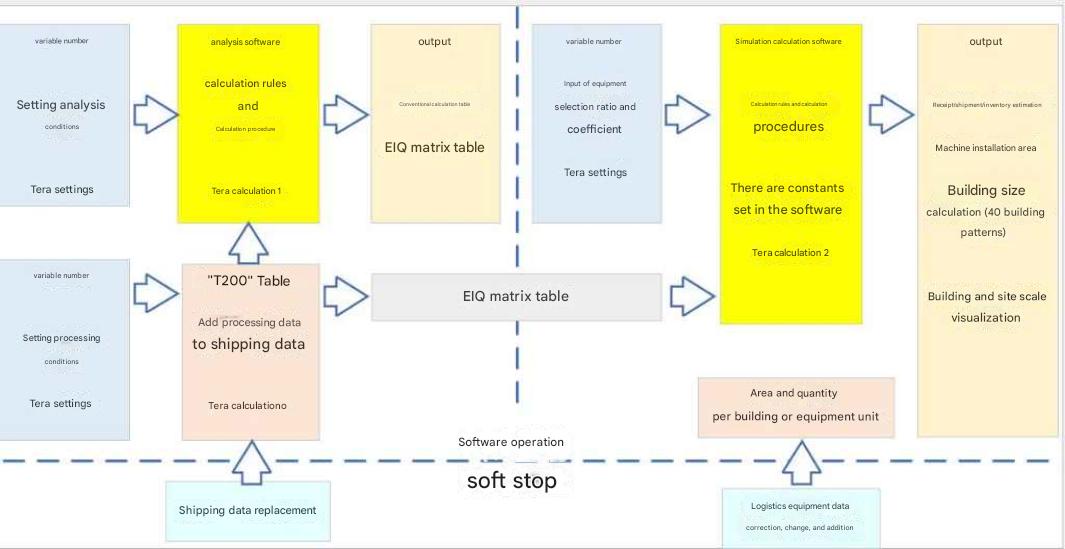
Software internal data and external data
The software's internal data is variable, and its initial value at startup is the Tera setting.
The external data, "Shipping Data" and "Logistics Equipment Data," are fixed values, and data changes are made when the software is shut down.
This external data is stored in the "Tera Calculation Data Folder."
The relationship between the software and variable/fixed data is as shown on the left.

Note: "Shipping Data" is completely fixed, but some logistics equipment data can be changed in the software. Calculations are displayed based on the changed values, but external data is not changed. When the software is restarted, the external data is incorporated into the calculation.

This overlaps with the explanation above, but
The processed data for Tera Calculation 0 is stored in a table called "T200" in Access, and all calculations for Tera Calculation 1 and Tera Calculation 2 are based on "T200."
Tera Calculation 1 adds volume and time concepts to EIQ analysis, dividing the data into 25 categories by shipping rank and outputting it in an EIQ matrix. Shipping data shipments are in bulk, but you can select and output the number of shipments, case equivalents, product liability equivalents, volume equivalents, and weight equivalents. Conditional output of these values ​​is also possible by specifying "shipping time," "shipping route," "item classification," and "shipping classification." Commonly used calculation methods, such as item totals and shipping destination totals, are also calculated and can be viewed simultaneously.
Tera Calculation 1 calculates values ​​necessary for system design, such as equipment selection and storage size/inbound/outbound capacity settings.
Tera Calculation 2 estimates inventory and incoming quantities from shipping data and calculates distribution center size by selecting pre-defined storage facilities and loading/unloading equipment. It calculates 40 building size options, including the number of building floors and berths. We have devised a way to visualize the balance between the building size and the site size.